
Search Our Database
Security | Securing Web Traffic using Modsecurity and Cloudflare
Introduction
Securing a website involves more than controlling which IP addresses and ports can reach a server. Web applications also process URLs, forms, cookies and API requests that may contain malicious input. This guide explains how to combine ModSecurity, a web application firewall (WAF) at the hosting server, with Cloudflare, which filters and optimizes traffic at the edge.
This guide explains how to secure your website in your Novacloud instance by adding Modsecurity (Layer 7 WAF) alongside Cloudflare (WAF + CDN).
Traditional Firewall operate at layer 3 / 4 (IP / Port), block traffic based on source IP, port or protocol.
Modsecurity operate at layer 7 (Application), inspects HTTP requests to detect and block malicious behavior based on application-layer patterns.
Cloudflare as a reverse proxy, place between your web server and the internet. It enhances both security and performance without requiring major changes to your web server:
- WAF at the Edge: Blocks malicious traffic before it reaches your origin server.
- DDoS Protection: Automatically mitigates volumetric and application-layer attacks.
- Bot Management: Detects and filters bad bots while allowing legitimate crawlers.
- Global CDN: Speeds up content delivery through caching across worldwide data centers.
- SSL/TLS Offloading: Encrypts traffic with minimal configuration on your server.
- DNS Control: Centralized DNS management with fast propagation and built-in failover.
Traffic flow:
Visitor → Cloudflare WAF/CDN → Security Groups → ModSecurity/web server → Website.
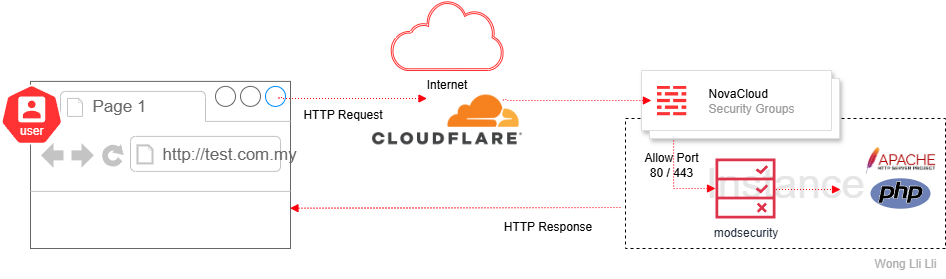
How the two protection layers work
- Network firewall (Layers 3/4): Controls access by source address, protocol and port, such as allowing only approved connections to the server.
- ModSecurity (Layer 7): Inspects HTTP requests using an active ruleset, such as the OWASP Core Rule Set (CRS), to detect common web attacks. Depending on its configuration, it can also inspect responses.
- Cloudflare (edge protection): Receives proxied web requests first, applies available WAF and bot protections, and can cache eligible content before forwarding requests to your server.
ModSecurity scans dynamic HTTP or HTTP/S traffic:
- .php, .asp, .jsp, .cgi (based on URL and content-type)
- GET and POST requests with query strings, form data, cookies, headers
- PUT, DELETE, PATCH methods for RESTful APIs
- AJAX and background HTTP calls (common in WordPress, Joomla, etc.)
- File uploads via multipart/form-data
- API calls with JSON/XML payloads
- WebSocket handshake headers (limited)
It scans HTTP payloads, not the file system itself.
It does NOT scan :
- Static file content (e.g., .jpg, .css, .js) beyond metadata
- Encrypted payloads without TLS termination
Recommended Rulesets
OWASP Core Rule Set (CRS) – Open source, broad coverage
Malware.Expert – Premium, optimized for performance and low false positives
Before you begin
- Administrator access to WHM or DirectAdmin, or authorized root SSH access.
- A supported web-server configuration with ModSecurity available; settings differ by panel, web server and version.
- A Cloudflare account with the domain’s authoritative DNS configured in Cloudflare.
- A recent configuration backup, a maintenance window and a way to recover access if a WAF rule affects administration.
Important:
WAF rules can block legitimate login, checkout, API, upload or WordPress administration requests.
- Always test changes on staging before live deployment
- Pair with Fail2Ban or CSF to ban abusive IP
- Cloudflare handles edge protection, ModSecurity handles origin-level threats
- Do not disable ModSecurity entirely if false positives occur, use rule ID exclusions. Whitelist legitimate false positives with SecRuleRemoveById
- Combine Cloudflare and ModSecurity for layered defense
- Review and Audit Regularly
- Pair with other security measures such as MFA, Captcha, VPNs and role-based authentication for added web server security.
Impact:
- False Positives: May break AJAX or REST APIs
- Performance: Heavy rulesets can impact server performance (required fine tuning)
- Access Loss: Blocking admin requests or API calls (e.g. update WordPress as wp-admin, some changes are not saved)
Part 1: Enable ModSecurity on the hosting server
Follow either Option A (WHM) or Option B (DirectAdmin) for the control panel installed on your server.
Option A: cPanel & WHM
Step 1: Confirm the ModSecurity module is installed
Log in to WHM, then open Software > EasyApache 4. Confirm the Apache ModSecurity module is installed before managing rulesets.
Check: The ModSecurity interfaces become available when the server supports and has enabled the module.
Step 2: Install the maintained OWASP Core Rule Set
In EasyApache 4, select an appropriate profile, open Additional Packages, and install ea-modsec2-rules-owasp-crs when using the supported ModSecurity 2 setup. Complete the profile provisioning process.
Older WHM screens may also show an OWASP ModSecurity Core Rule Set V3.0 vendor installation under Security Center > ModSecurity Vendors. cPanel identifies that older vendor ruleset as no longer updated; use the maintained package where supported.
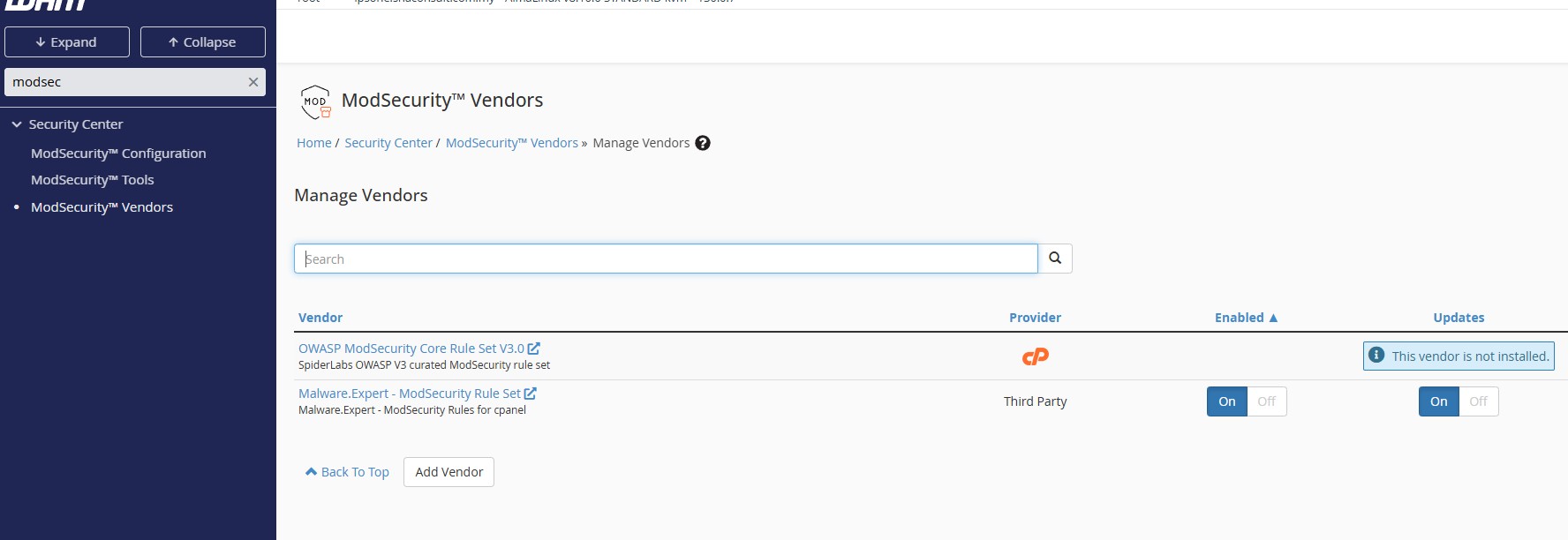
Check: The OWASP rules are installed and enabled. Interface labels may differ from this earlier screenshot.
Step 3: Review enforcement and rule activity
Use Security Center > ModSecurity Configuration to check the processing engine and Security Center > ModSecurity Tools to review rule hits. Confirm protection is active for the intended domains.
Option B: DirectAdmin (Evolution skin)
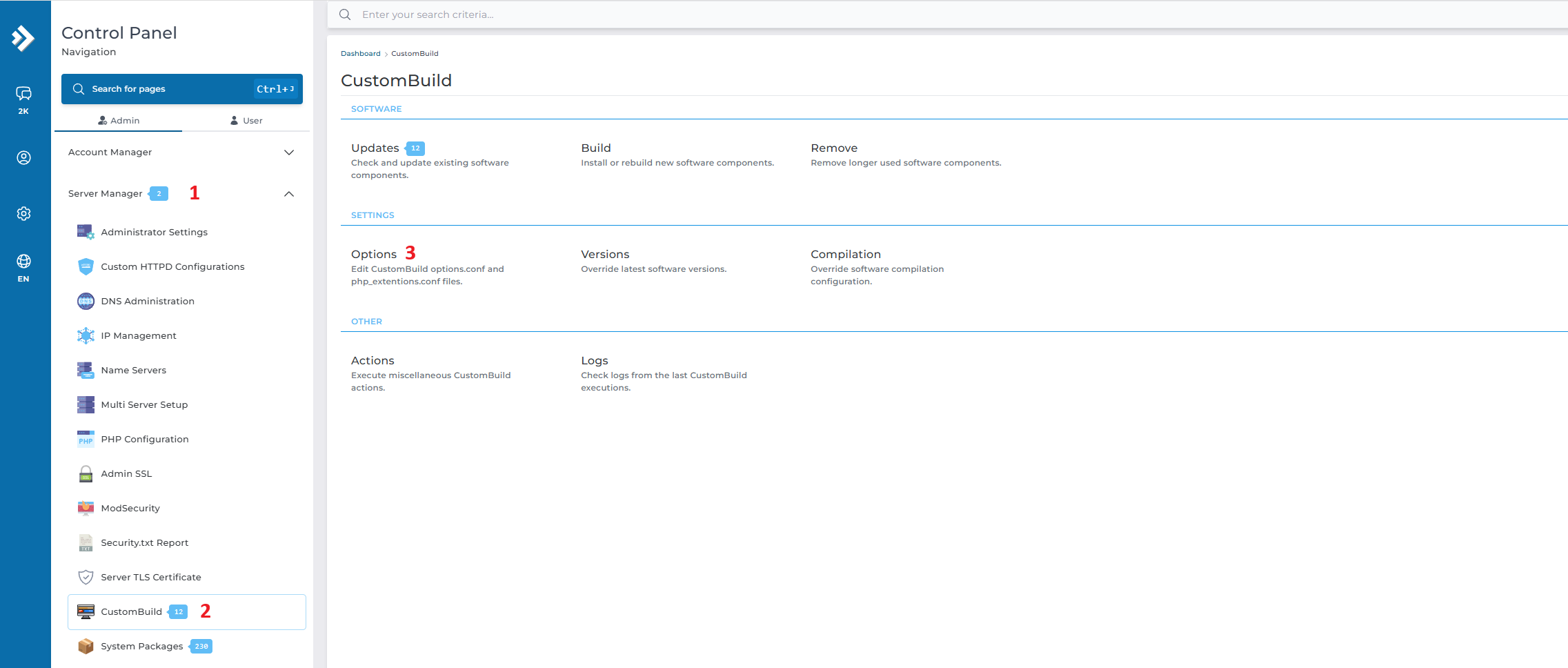
Step 1: Open the CustomBuild options
Log in as an administrator. Open Server Manager > CustomBuild > Options in the Evolution interface (menu wording may differ by version).
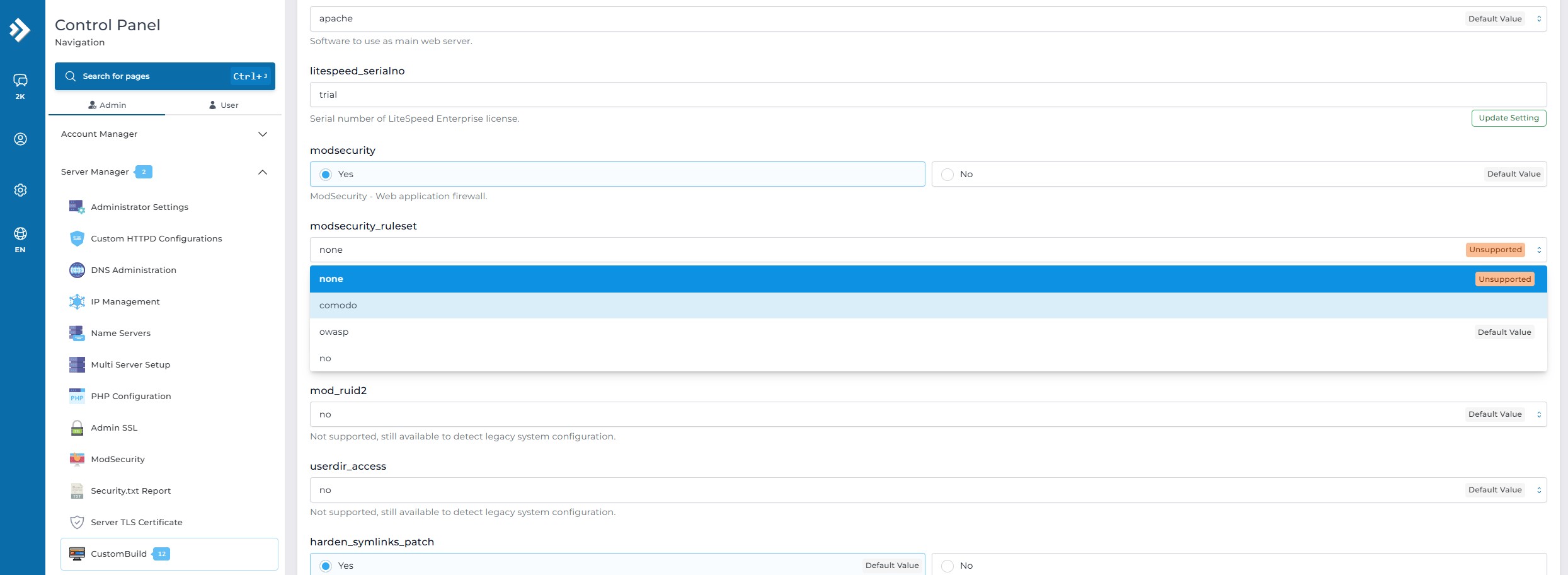
Step 2: Select ModSecurity and OWASP rules
Set ModSecurity to Yes and choose OWASP for the ModSecurity ruleset. Confirm the options have been saved before starting the build.
Step 3: Build ModSecurity and check the result
Return to the CustomBuild build interface and run the ModSecurity build task. Wait for completion and check for build errors. Review Server Manager > ModSecurity for global settings and rule activity.
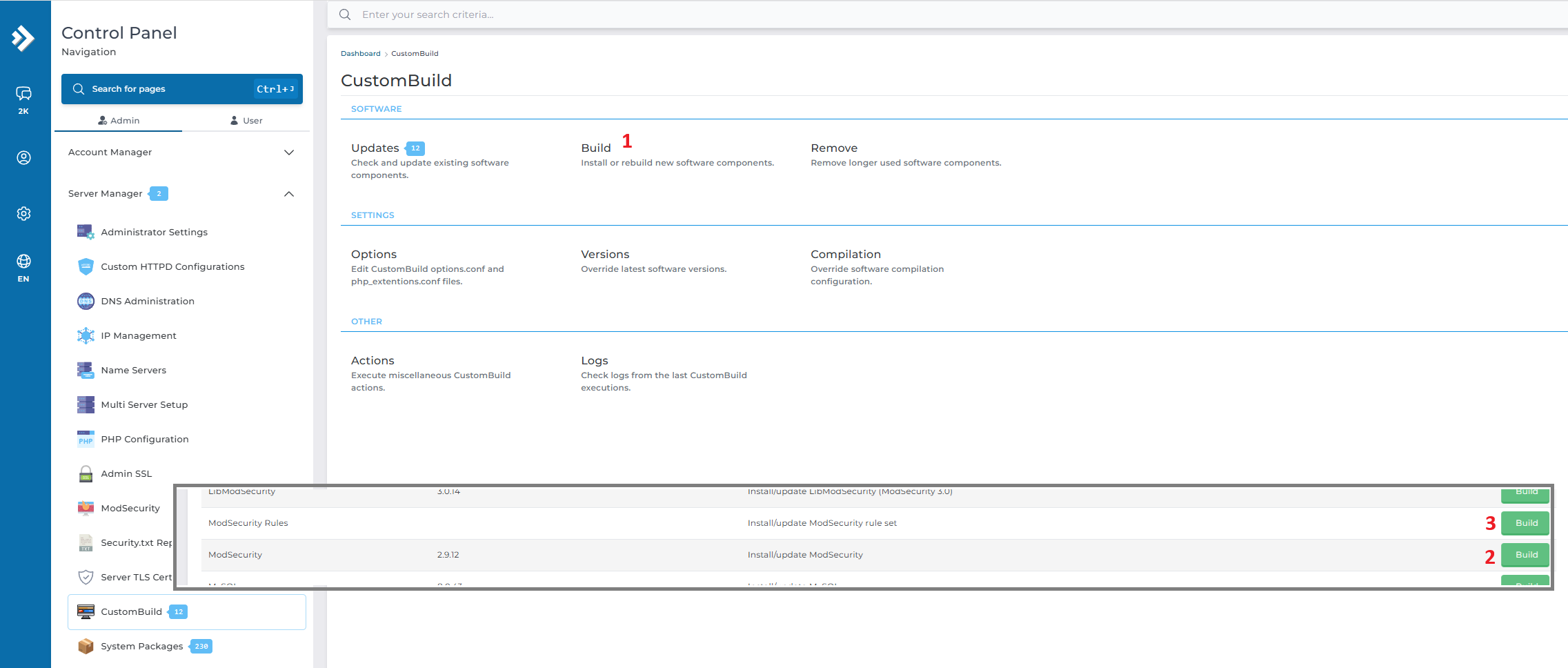
Check: The build completes successfully and ModSecurity is available for your websites.
Optional: Configure DirectAdmin from the CLI
For administrators who prefer a root shell, DirectAdmin documents the following CustomBuild commands. Apply them in an approved maintenance window:
da build set modsecurity_ruleset owasp
da build modsecurity
If the generated web-server configuration also requires updating, refer the DirectAdmin documentation before using da build rewrite_confs.
Part 2: Enable Cloudflare edge protection
Enabling Cloudflare for Additional Protection
Cloudflare Free and paid plans support essential security features like DNS management, SSL, and basic WAF rules. For more advanced protections (e.g., custom WAF rules, Bot Management, detailed analytics), upgrading to a Pro or higher plan is recommended, but it’s not mandatory for basic protection.
- Ensure your domain is pointed to Cloudflare DNS
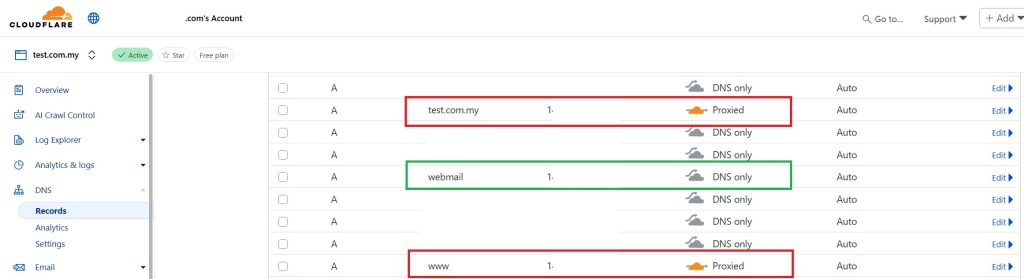
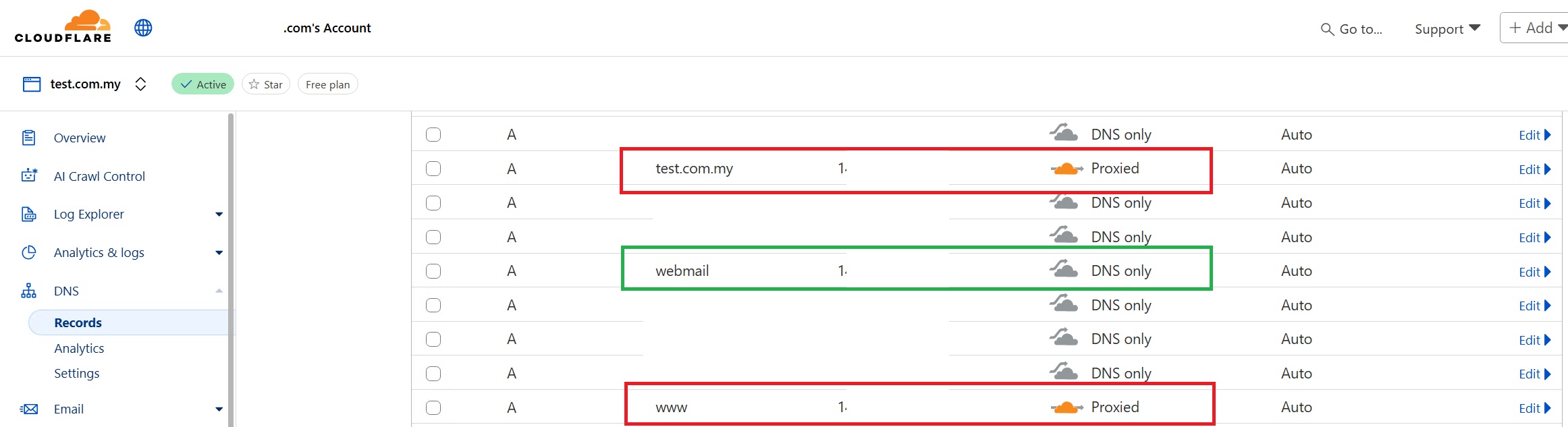
- Log in to Cloudflare Dashboard > DNS > Records
-
Cloudflare Orange Proxy (Proxied – Orange) :
Enables Cloudflare’s protection and CDN features for a domain-
Traffic passes through Cloudflare, activating WAF, DDoS protection, caching, and HTTPS.
-
Recommended for web traffic (HTTP/HTTPS).
- in this example, we enabled Cloudflare proxy (orange colour) for domain.com and www.domain.com
-
-
Cloudflare DNS Only (DNS only – grey):
Used for non-web services like email (MX, mail.domain.com, webmail.domain.com).-
Cloudflare does not proxy or filter traffic.
-
Ensures direct delivery and avoids SMTP blocking or SSL certificate issues.
-
- Go to Security > WAF to setup your WAF / custom rules. Please refer to official guide : https://developers.cloudflare.com/waf/managed-rules/deploy-zone-dashboard .
- Enable the following:
- Managed Rulesets
- Bot Fight Mode
- Super Bot Protection (Enterprise only)
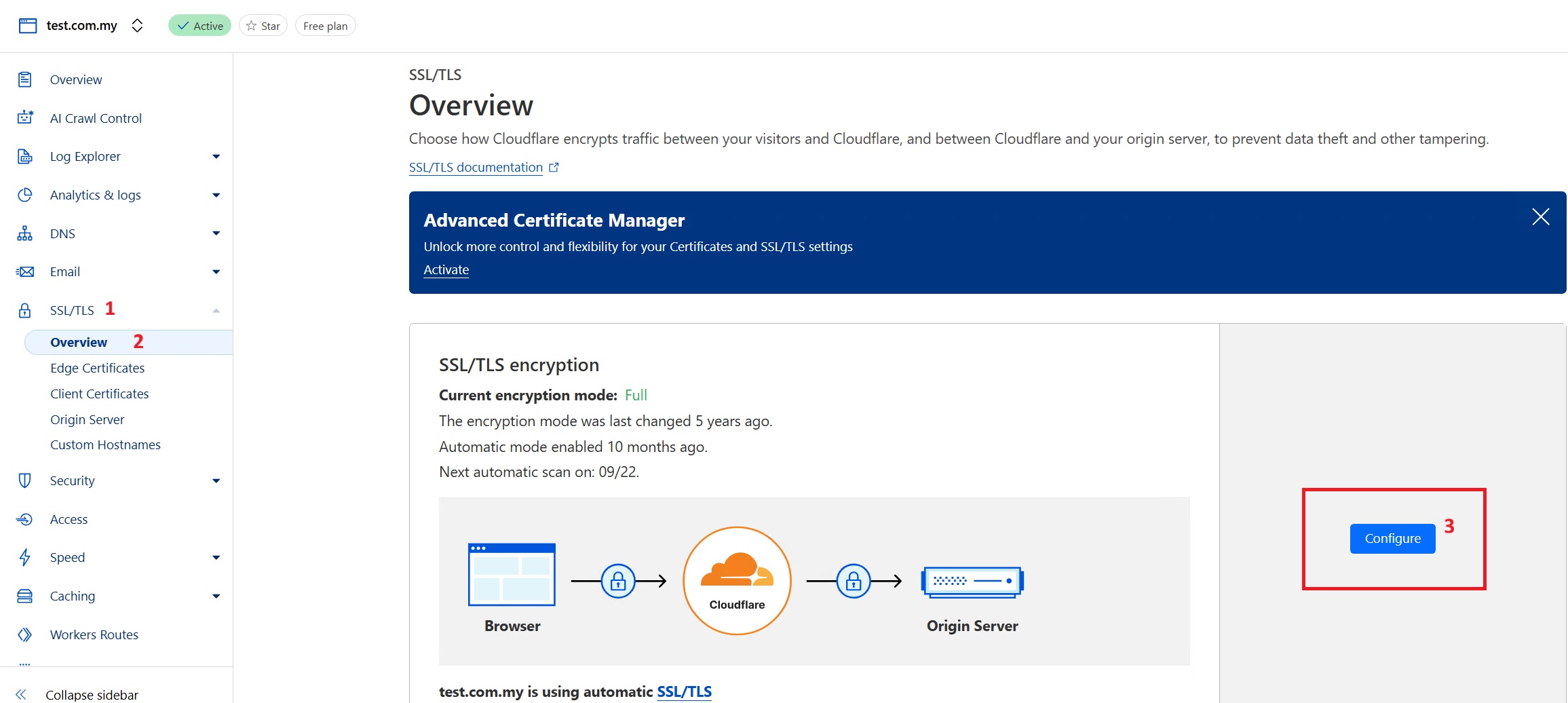
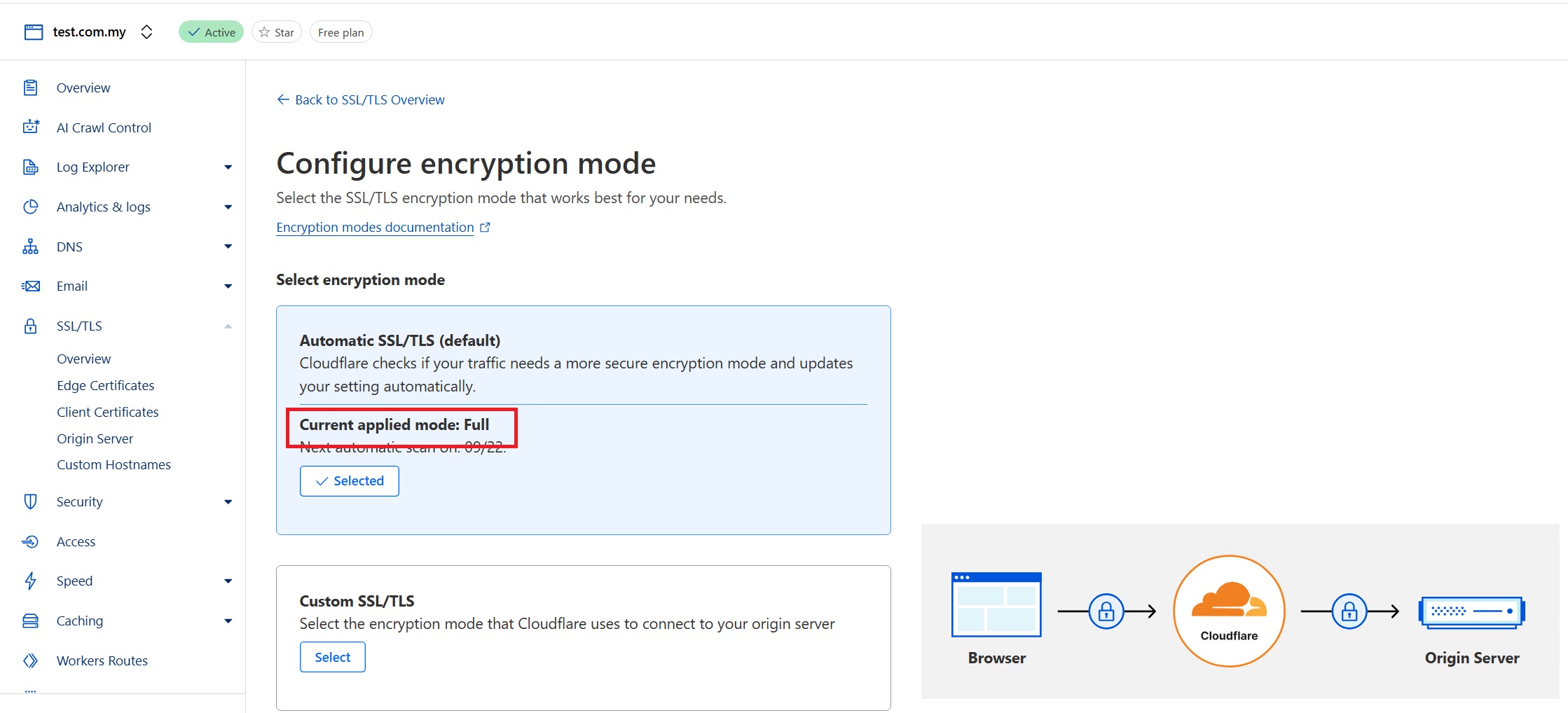
- Ensure SSL mode is set to Full (strict)
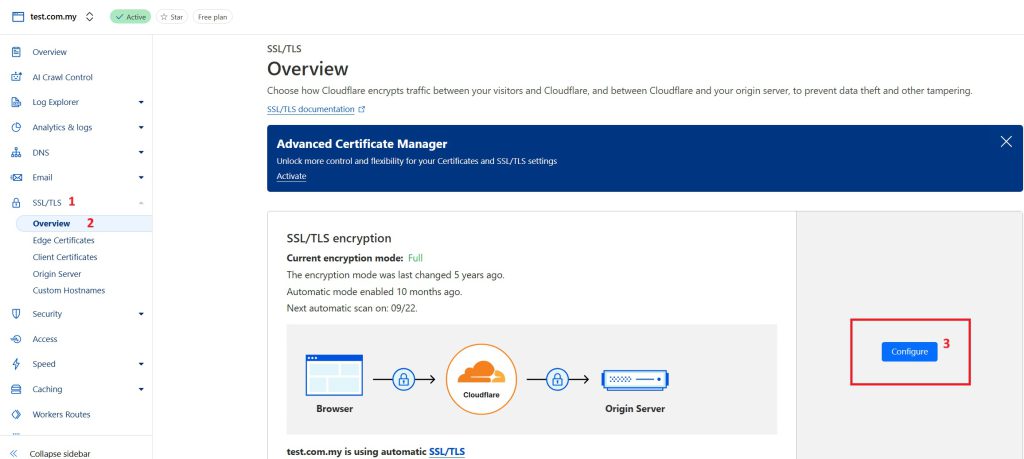
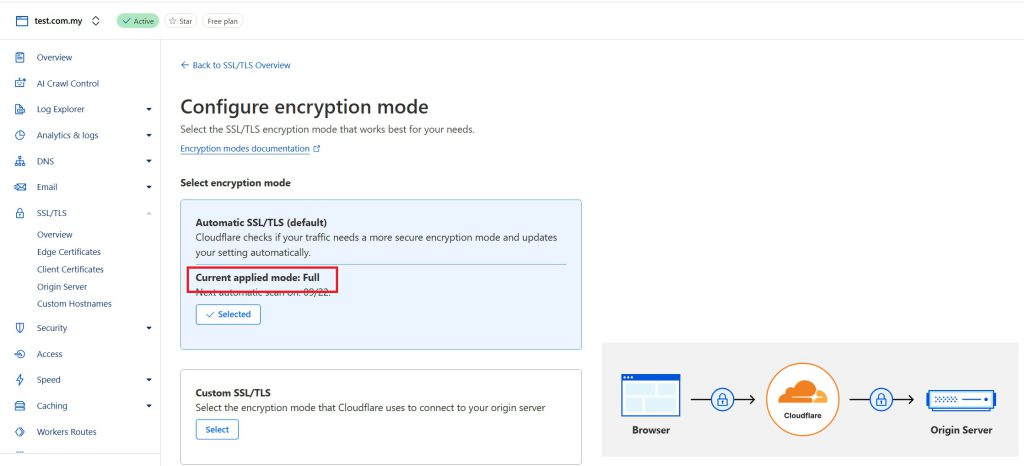
- Test your application functionality to avoid false blocks
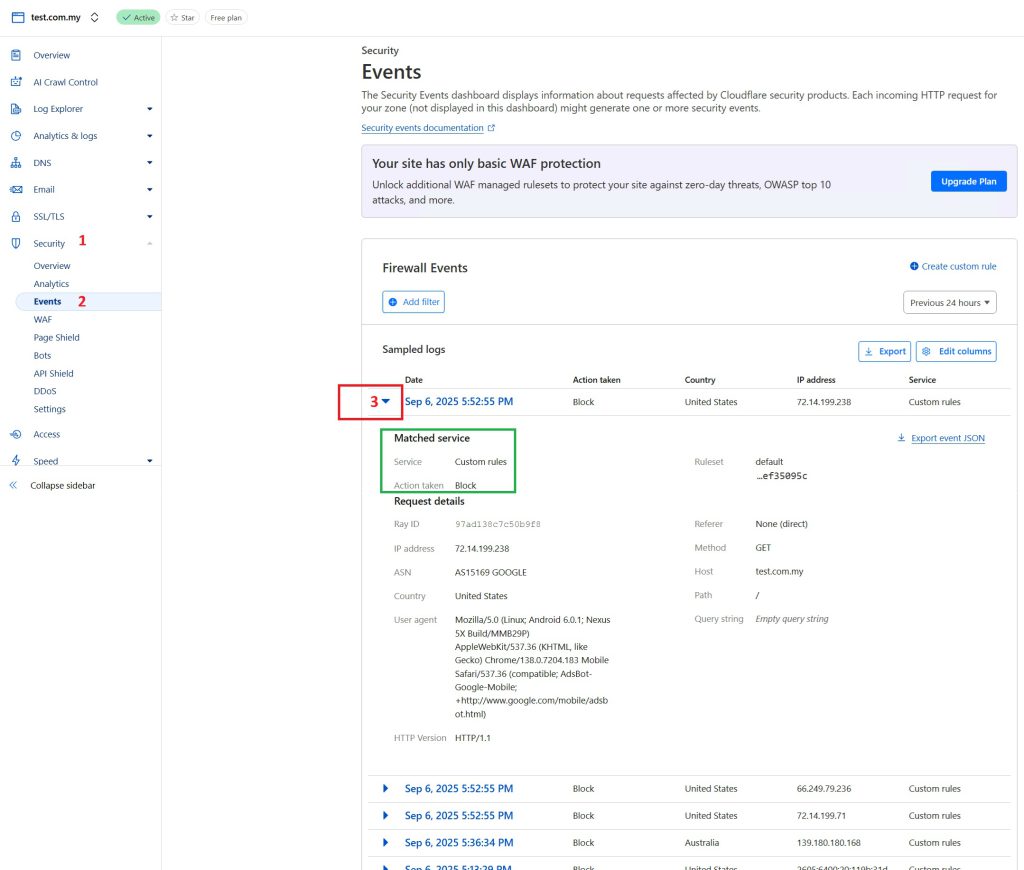
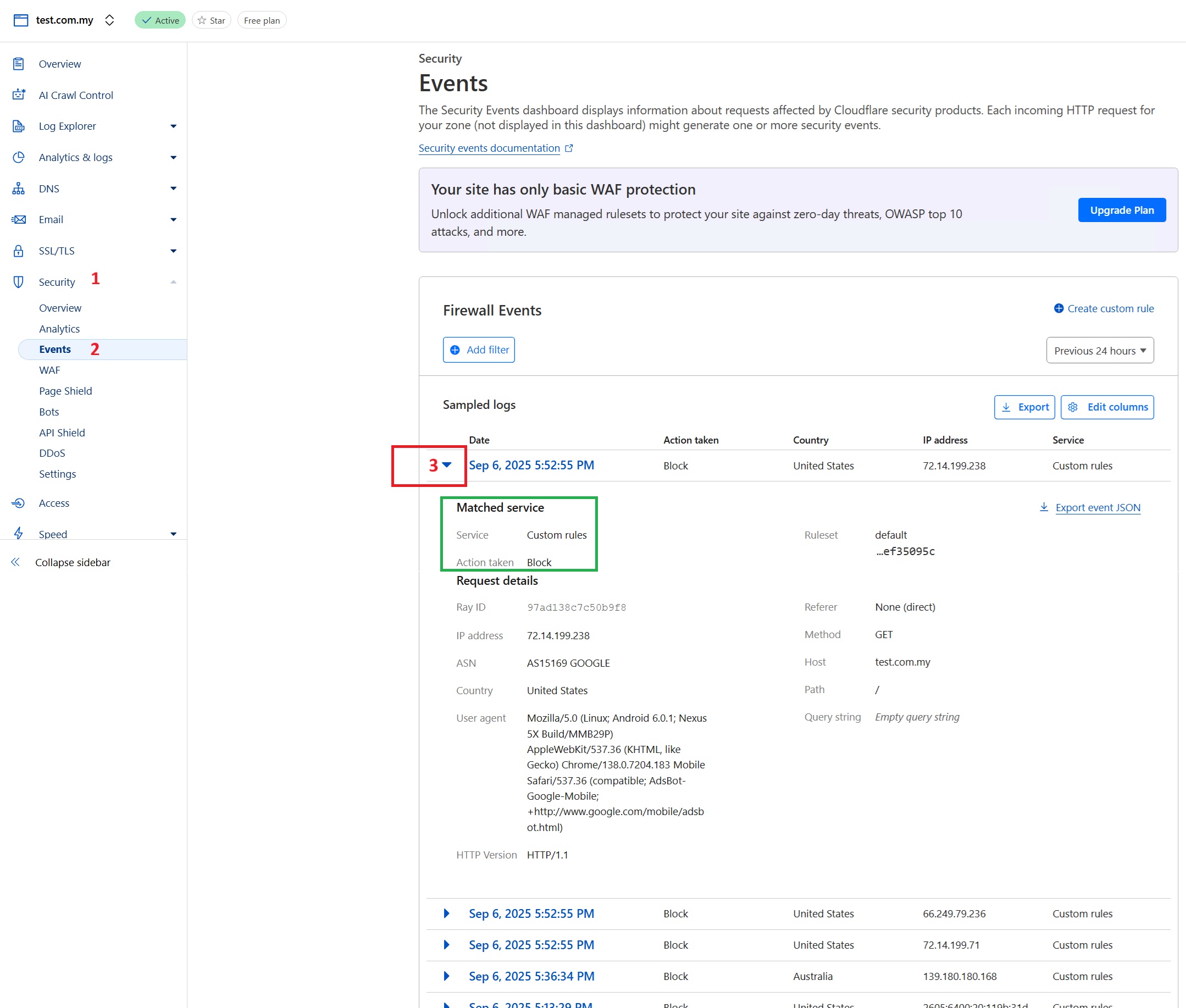
- You can review the blockages in Security > Security Events https://developers.cloudflare.com/waf/analytics/security-events/
- (optional) Click on Add Filter if you are searching for specific URL or IP
Verify and tune your protection
- Test the homepage, login, WordPress administration (if applicable), forms, file uploads and API endpoints after enabling rules.
- Review ModSecurity audit or hit logs on the origin and Cloudflare security events separately. A request blocked at Cloudflare will not necessarily appear in the origin’s ModSecurity logs.
- For legitimate requests blocked by a specific rule, investigate the matching rule ID and use the narrowest suitable exception. Avoid disabling an entire WAF or globally removing broad protections for a single false positive.
- Where practical, restrict the origin’s public web ports to Cloudflare’s published IP ranges using the cloud security group and host firewall, while preserving required administrative, health-check and non-web service access. Configure trusted proxy/client-IP handling appropriately.
Protection requires ongoing monitoring, ruleset updates and adjustment as the application changes. Neither WAF replaces regular patching, backups, access control or secure application development.
Conclusion
ModSecurity with Cloudflare isn’t just a technical upgrade, it’s a strategic defense approach. ModSecurity scan deep into HTTP traffic, blocking malicious intent before it reaches your application, while Cloudflare stands as first line of defense at the edge, blocking threats at scale. When these tools are configured properly and maintained, you’re not just reacting to threats, you’re actively reducing attack surface of your web application to common web threats against unauthorized access while maintaining operational control.
Always remember: security is not a one-time setup, but an ongoing process of staying ahead, monitoring, tuning, and adapting.
“Security is when done right, letting you focus on growth, not threats.”
References
- OWASP Core Rule Set
- cPanel & WHM – ModSecurity Vendors
- cPanel & WHM – OWASP ModSecurity CRS
- DirectAdmin – ModSecurity
- Cloudflare – Managed Rules
- Cloudflare – Full (strict) SSL/TLS
- Cloudflare – Security Events
Through technology, we learn. Through sharing, we connect.
Explore more guides at https://kb.ipserverone.com/
For technical support / service enquiries, please reach out to support@ipserverone.com for assistance.