
Search Our Database
Portal Dashboard Overview
Introduction
Welcome to the new and improved IPServerOne Customer Portal! 🎉 Designed to enhance your workflow, the dashboard offers a centralized space to manage your services, billing, and support more efficiently. Whether you need to deploy cloud resources, make payments, or submit a support ticket, everything is just a few clicks away.
Dashboard Features Overview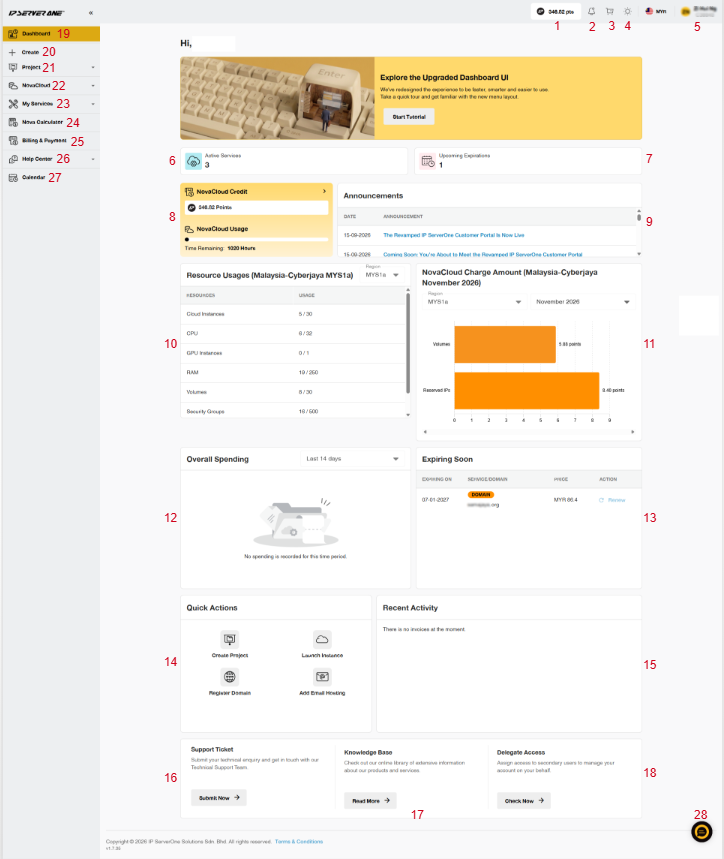
-
- 💳 Cloud Credit Balance: View your available cloud credit points.
- 🔔 Notifications: View important updates, service alerts, and reminders.
- 🛍️ Shopping Cart: Review and checkout your selected services.
- ☀️ Theme Settings: Switch between light and dark mode.
- 👤 User Menu: Access My Account or Log Out.
- ⚙️ Active Services: View the total number of your active services.
- 📅 Upcoming Expirations: Keep track of services that are expiring soon.
- ☁️ NovaCloud Credit & Usage: View your available cloud credit balance and estimated remaining usage time.
- 📢 Announcements: Stay informed with important updates and service notifications.
- 🖥️ Resource Usages: View and monitor your cloud resource usage and available limits by region.
- 💰 NovaCloud Charge Amount: View your monthly cloud resource charges in points, filtered by region and month.
- 💳 Overall Spending: View and track your spending based on the selected time period.
- 📅 Expiring Soon: View services nearing expiration and renew them before the expiry date.
- ⚡ Quick Actions: Quickly access common tasks such as creating projects, launching cloud instances, registering domains, and adding email hosting.
- 🕒 Recent Activity: View your latest account activities and transactions.
- 🎫 Support Ticket: Submit technical enquiries and get assistance from our Technical Support team.
- 📚 Knowledge Base: Access helpful guides and information about our products and services.
- 👥 Delegate Access: Grant access to secondary users to manage your account on your behalf.
- ⏰ Dashboard: Where you are directed upon logging in the portal.
- ➕ Create: Quickly browse and purchase new services.
- 🗂️ Project: View, create, and manage your NovaCloud projects and their associated resources.
- ☁️ NovaCloud Menu: Access and manage your cloud instances, networks, storage, security settings, DNS, and other cloud resources, including usage and monitoring.
- 🛠️ My Services: View and manage your domain and security services, including SSL certificates.
- 🧮 Nova Calculator: Customize your cloud resources and estimate the cost of NovaCloud and NovaGPU services based on your requirements.
- 💳 Billing & Payment: Manage pending payments, renew services, view payment history, and download invoices or account statements.
- 🛠️ Help Center: Create and manage support tickets directly from your dashboard.
- 📅 Calendar: Easily view daily, weekly, and monthly schedules.
- 💬 Live Chat: Instantly connect with the IPServerOne team for real-time assistance.
Conclusion
The new IPServerOne Customer Portal is designed to enhance your user experience with an intuitive and user-friendly interface. Explore all the features and make the most of the convenient tools available at your fingertips!
Article updated on 2 November 2026 by Zihui